

AnchorQueen User Manual
Welcome aboard. AnchorQueen is a complete marine companion: nautical chart,
anchor watch, AI marine officer, weather, store, and captain profile — all in
one app. This manual covers every screen.
The manual works fully offline — no connection needed at sea.
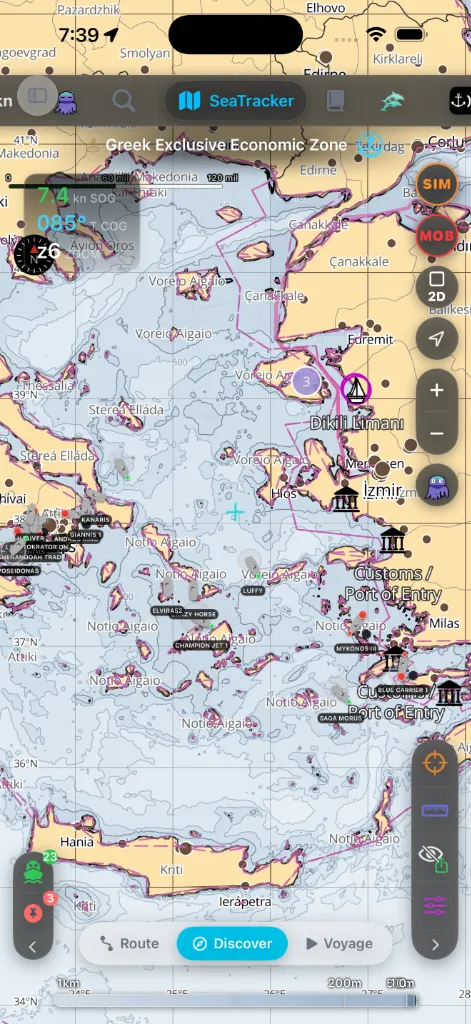
How the app is organized
AnchorQueen has eight tabs along the side (landscape / iPad) or top
(portrait iPhone). AnchorQueen is the chart; its pill opens three more
chart modes — Sea Sports, Capt's Notebook and Merconi. The other
seven tabs — SafeAnchor, Remote, Meteo, Jules, Store, Captain and Settings —
are companion tabs.
| # | Tab | What it is for |
|---|---|---|
| 1 | 🗺️ AnchorQueen (chart) | The nautical chart. Plan routes, discover places, navigate voyages. |
| – | 🏄 Sea Sports | A chart mode for water sports: live instruments, depth-free routes, routes shared by other captains, voyages and a tutorial. Reached from the chart pill menu, between AnchorQueen and Merconi. |
| – | 📓 Capt's Notebook | Your private chart, organised around the marks you have saved. Reached from the chart pill menu. |
| – | 🐬 Merconi | Marine-life and ocean exploration — dive sites, fishing watch, ocean data. Reached from the chart pill menu. |
| 2 | ⚓ SafeAnchor | The anchor watch — radar, alarm, remote monitoring, and Apple Watch companion. |
| 3 | 📡 Remote | Live boat sharing — watch a boat or a flotilla, with drift alerts ashore. |
| 4 | ⛈️ Meteo | Marine weather, tides, alerts, and the 10-day meteogram. |
| 5 | 🐙 Jules (CrewAI) | Your AI co-captain. Ask anything, by voice or text. |
| 6 | 🛍️ Store | Chart regions and subscriptions. |
| 7 | 👤 Captain | Your profile, sign-in, preferences, subscription status. |
| 8 | ⚙️ Settings | Every app preference, plus installed chart regions and partners. |
Read this first
the notes for every earlier release you can switch between.
do in the first five minutes.
sidebar, map controls, and MOB button that float over every tab.
One topic per tab
When something is off
direct Wi-Fi AIS equipment, NMEA 2000 gateways, and generic NMEA sources.
Safety notice
AnchorQueen aids navigation and anchor watch. It does not replace official
nautical charts, a tide table, a proper anchor watch in heavy weather, or the
rules of the sea.