
 Allarme ancora
Negozio — abbonamenti e regioni cartografiche
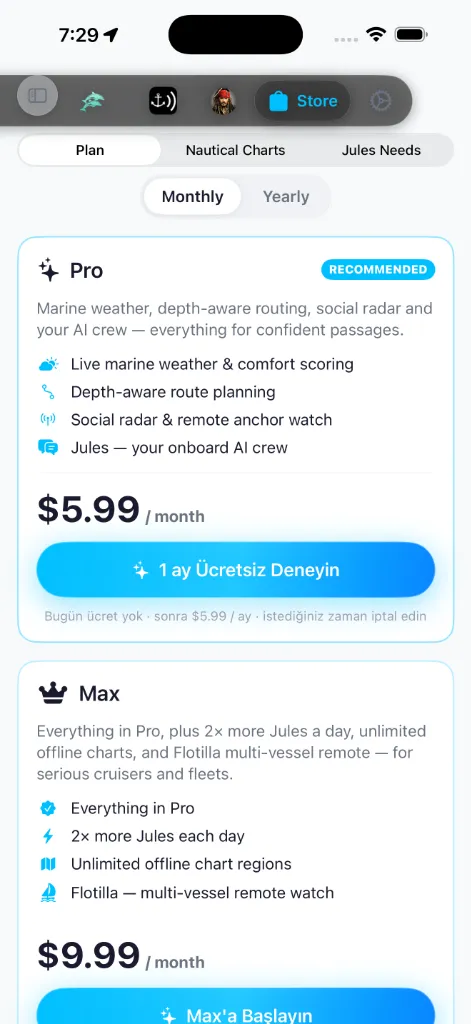
La scheda Negozio ha tre sezioni, commutate da un controllo segmentato:
Piano — abbonamenti. Carte nautiche — regioni cartografiche.
Jules Needs — pacchetti di token una tantum per l'equipaggio IA.
Un banner promozionale in alto mostra l'offerta attuale, se presente.
Piano — abbonamenti
Due piani a pagamento — Pro e Max — sono mostrati affiancati, ciascuno una
scheda principale che elenca prezzo, funzioni e un pulsante d'acquisto, con un
interruttore condiviso Mensile / Annuale sopra di essi. Pro porta un badge
CONSIGLIATO. Il piano su cui sei attualmente è contrassegnato Piano attuale, e
mostra quando si rinnova la prossima volta — Si rinnova il 12 mag 2026 — oppure,
se hai annullato, quando scadrà — Scade il 12 mag 2026.
Dal piano gratuito il pulsante d'acquisto legge Inizia Pro o Inizia Max, con
una riga Annulla in qualsiasi momento · nessun impegno a lungo termine sotto di
esso. Se sei già su Pro e stai guardando la scheda Max legge Passa a Max. Una
prova gratuita non è garantita: solo se un piano è configurato con una il pulsante
passa a Prova N giorni gratis e aggiunge una riga Nessun addebito oggi · poi
$prezzo · annulla in qualsiasi momento — al momento della scrittura nessun piano
porta una prova, perciò il percorso attivo è quello Inizia / Annulla-in-qualsiasi-momento sopra.
L'opzione di fatturazione Annuale porta un badge RISPARMIA % (o un badge
MIGLIORE VALORE mentre i risparmi esatti si stanno ancora caricando) e una nota
"Fatturato annualmente · circa ≈ equivalente al mese" così puoi confrontare con
Mensile a colpo d'occhio.
L'intero Negozio — Piano, Jules Needs e le schede delle regioni cartografiche — segue
la lingua del tuo dispositivo; su un dispositivo turco ogni etichetta, pulsante e
badge è mostrato in turco.
Un banner Quota giornaliera IA di Jules (la scheda polpo) espone quanto
Jules ottiene ogni livello al giorno, così i piani sono comparabili a
colpo d'occhio:
Questo è un budget giornaliero che si ricarica ogni giorno; per ricariche una tantum
in aggiunta, consulta [Jules Needs](#jules-needs) sotto.
Cosa sbloccano gli abbonamenti:
e guardia all'ancora remota.
Max aggiunge due cose oltre a tutto ciò che c'è in Pro:
carte gratuito).
Sotto i piani c'è una piccola riga Componenti aggiuntivi, mostrata solo quando
c'è qualcosa da offrire. Due prodotti emergono qui:
immagini satellitari ad alta risoluzione sulla carta.
SafeAnchor Remoto da sole; concede lo stesso accesso
Remoto di livello Pro senza un piano Pro completo.
Ciascuno mostra il proprio prezzo; toccandolo si apre il foglio d'acquisto di Apple.
(Un prodotto Giornale di bordo del capitano separato è legacy e non più venduto ai
nuovi capitani.)
Apple gestisce la fatturazione. Per annullare, usa iOS Impostazioni → il tuo nome →
Abbonamenti — AnchorQueen resta sul piano gratuito quando il periodo a pagamento finisce.
Migrazione di app e prodotti legacy
Con il lancio dell'app unificata AnchorQueen (che fonde le piattaforme legacy autonome AnchorAlarm e SeaTracker in un unico spazio di lavoro unificato), abbiamo semplificato i nostri piani di abbonamento e ritirato i prodotti legacy:
Carte — regioni
La sezione Carte gestisce sia le regioni che hai già sia ti permette di sfogliarne e
acquistarne di nuove. È divisa da un selettore segmentato Le mie mappe | Negozio:
Mediterraneo, costa orientale degli Stati Uniti, Baltico e così via.
In alto, un riepilogo dell'archiviazione mostra tre statistiche: Installate
(conteggio regioni), Sul dispositivo (disco usato) e Disponibili (regioni che
puoi ancora scaricare). Una pillola Controlla aggiornamenti sta sotto di esse;
toccandola si forza un aggiornamento del catalogo e si mostra un avviso — *Tutte le
carte sono aggiornate. o N aggiornamenti disponibili.* Tira giù per aggiornare
esegue lo stesso controllo silenziosamente.
Un interruttore Mappa / Elenco (in alto a destra) commuta come è mostrato il catalogo:
aprirne il foglio di dettaglio. Una legenda sta nell'angolo: verde Installata,
arancione In download, indaco Disponibile, grigio Non disponibile.
Ogni scheda regione mostra una miniatura di copertina dell'area, la dimensione di
download (o su disco), la fonte dati e badge di stato. Le schede installate aggiungono
badge di salute e licenza:
quando hai posticipato un aggiornamento offerto.
disco — tocca il badge per riscaricare solo i file offline guasti (i tuoi dati
personali non vengono mai toccati).
Su una scheda installata il comando finale è un interruttore di visibilità più un
menu (Mostra in Carte, Elimina). Quando un aggiornamento è offerto diventa una pillola
AGGIORNA, e il menu acquisisce Aggiorna a v… e Ricordamelo più tardi (che
rimanda quella esatta versione finché non ne viene pubblicata una più recente).
Quota Pacchetti carte gratuiti
A seconda del tuo livello di abbonamento, ricevi posti Pacchetto carte gratuito gratuiti che ti permettono di sbloccare regioni cartografiche complete ad alta risoluzione senza acquistare singoli abbonamenti:
Se desideri accedere a più regioni cartografiche oltre la quota gratuita del tuo livello, puoi acquistare singoli abbonamenti annuali a pagamento ($14,99/anno per regione) senza limite al numero di regioni che puoi detenere.
Il registro permanente dei posti (Politica anti-frode)
Per garantire la correttezza e prevenire abusi di rotazione dei posti (come reclamare, eliminare e ruotare ripetutamente le regioni), i pacchetti carte gratuiti reclamati utilizzano un Registro permanente dei posti sicuro:
Gratis per te — sezione fissata
Quando stai sfogliando la sotto-scheda Negozio, qualsiasi regione che non ti costa
nulla in questo momento viene sollevata in una sezione Gratis per te fissata in
cima all'elenco (contrassegnata con un'icona regalo). Questo copre due casi:
scarica, nessun addebito).
non possiedi ancora è reclamabile, perciò il catalogo la fa emergere qui con un
pulsante RECLAMA GRATIS (con un conteggio "N rimasti" sotto di esso). Una volta
che i tuoi posti sono esauriti (o sul livello Gratuito, che non ne ha), la sezione si
comprime e restano solo le regioni possedute.
Le regioni a pagamento continuano a comparire sotto, raggruppate per costa.
Tocca una scheda per aprire il foglio di dettaglio della regione, che si legge come
una breve guida di crociera per l'area:
coordinate dell'angolo sud-ovest → nord-est, derivate dal riquadro di delimitazione
della regione.
della linea di costa, marina, ausili alla navigazione, pericoli cartografati).
secondario Oppure abbonati
Una regione che installi diventa disponibile offline su ogni scheda carta —
SeaTracker, Capt's Notebook e Merconi.
Le mie carte — stato dell'abbonamento
Le regioni che hai reclamato o a cui ti sei abbonato compaiono sotto Le mie carte, e ogni scheda mostra a che punto è il suo stato di licenza:
Ciclo di vita di scadenza e periodo di grazia
Per bilanciare sicurezza e incolumità in mare, le regioni scadute (sia abbonamenti a pagamento sia pacchetti gratuiti scaduti) attraversano un ciclo di vita di scadenza a 3 stati. Lo stato si mostra sulla scheda regione come uno dei badge descritti in [Le mie carte](#my-charts) sopra — un verde Si rinnova / Pacchetto gratuito attivo, un arancione Scaduto · Tracciamento disabilitato / Pacchetto gratuito scaduto / Rinnova · $prezzo toccabile, o un rosso Scaduto · Bloccato:
Lo stato di una carta si aggiorna automaticamente quando si rinnova, quando annulli o dopo un Ripristina acquisti.
Jules Needs — pacchetti di token
Ogni piano dà a Jules un budget giornaliero di token che si azzera
ogni giorno. Se lo esaurisci prima dell'azzeramento — una lunga sessione di
pianificazione, una traversata intensa — la sezione Jules Needs vende pacchetti
di token una tantum che aggiungono capacità bonus oltre il tuo budget giornaliero.
In alto, un pannello di utilizzo mostra a che punto sei oggi:
Sotto ci sono tre pacchetti, dal più piccolo al più grande:
Ogni scheda mostra il suo conteggio di token, una frase di richiamo di una riga e un
pulsante Acquista · $prezzo; Apple mostra il proprio foglio di conferma. Non
appena l'acquisto si completa, i token vengono aggiunti al tuo saldo bonus e il
pannello di utilizzo si aggiorna.
I pacchetti di token sono un acquisto una tantum, non un abbonamento. I token
bonus non scadono mai, e vengono prelevati solo dopo che il budget giornaliero del
tuo piano è esaurito — così un pacchetto che acquisti oggi aiuta ancora settimane dopo.
Aggiornamenti
Quando nuovi dati vengono pubblicati per una regione, un badge di aggiornamento
compare sulla scheda Negozio stessa e sulla scheda regione. Tocca Aggiorna per
recuperare i dati freschi; l'installazione vecchia viene sostituita in modo atomico.
Ricerca e filtri
Una barra di ricerca restringe il catalogo per nome. Le pillole filtro raggruppano le
regioni per mare o continente.
Se qualcosa va storto
di aver effettuato l'accesso con l'ID Apple che hai usato per acquistarla.
regione, o annulla e ricomincia su una connessione migliore.