
 Allarme ancora
Jules — il tuo ufficiale di marina IA
Jules è l'ufficiale di marina IA di AnchorQueen. Poni una domanda e un membro
d'equipaggio esperto risponde — per iscritto o a voce.
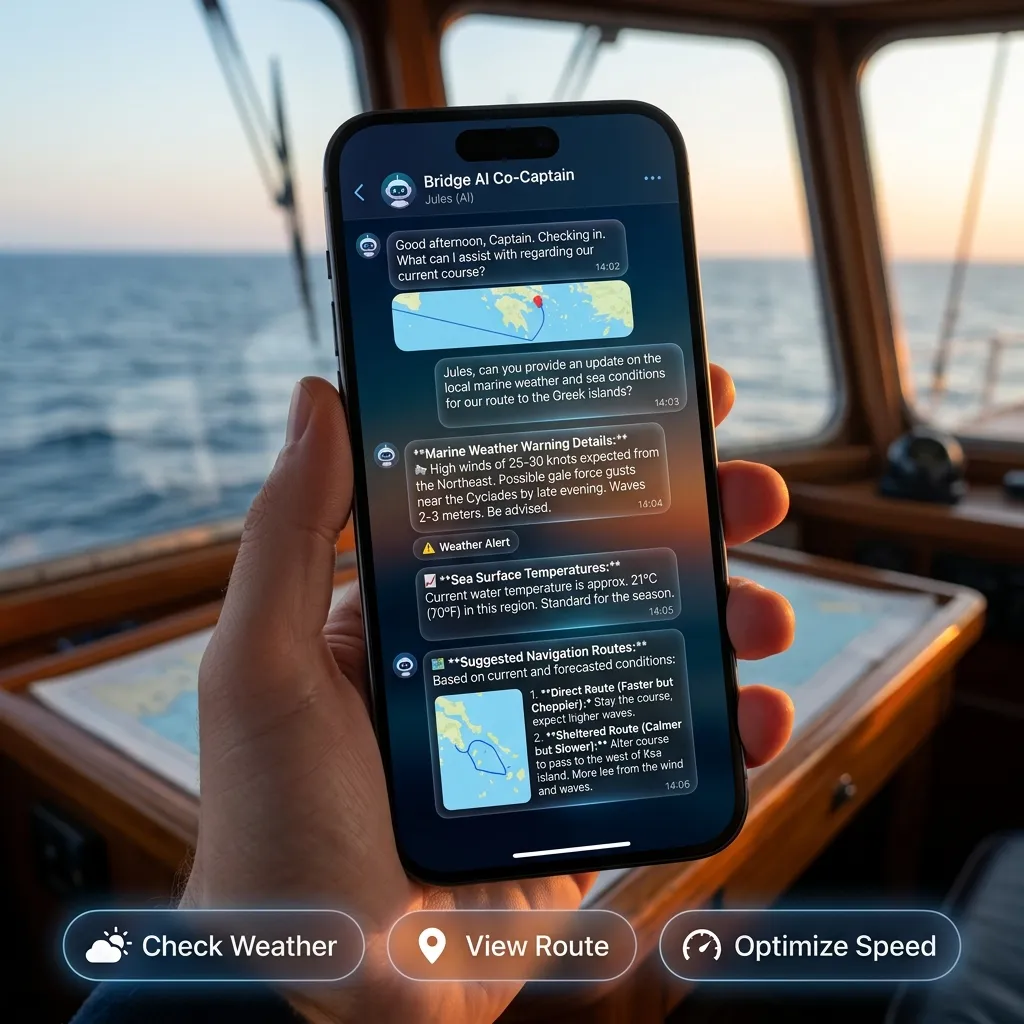
La chat
Una semplice conversazione a due colonne. I tuoi messaggi da un lato, le risposte di
Jules che arrivano in streaming dall'altro, con avatar e marche temporali.
Una fila di pillole degli ufficiali in alto ti permette di scegliere con quale
ufficiale stai parlando. Ognuno ha il proprio sfondo e la propria area di competenza —
un meteorologo, un navigatore, un pianificatore di traversate. Tocca un ufficiale
diverso per cambiare contesto per la prossima domanda.
Accanto all'avatar di Jules nell'intestazione sta una breve riga di stato che
riflette il suo umore attuale — calma, al lavoro, o un'allerta meteo come un avviso di
tempesta. Si mostra su una riga e può terminare con dei puntini di sospensione quando
è lunga; toccala per espandere il messaggio completo, e tocca di nuovo per comprimere.
Cronologia chat
Jules tiene ogni conversazione come thread separato — proprio come ChatGPT, Gemini o
Claude. Tocca il pulsante cronologia (l'icona orologio-con-freccia) in alto a
sinistra della chat per far scorrere aperto il cassetto della cronologia chat. È
separato dal Menu sinistro dell'app — aprire il cassetto della cronologia chiude il
Menu sinistro, e viceversa, così i due non si sovrappongono mai.
giorni e Più vecchie — le più recenti in cima.
messaggio) e un'anteprima di una riga dell'ultima risposta. La chat attiva è
evidenziata.
quale ufficiale ci stavi parlando.
nuovo — le tue altre conversazioni vengono mantenute, non cancellate.
Quando riapri la scheda Jules, atterri di nuovo sulla tua conversazione più recente.
Se hai effettuato l'accesso, la tua cronologia chat si sincronizza tra i tuoi
dispositivi automaticamente.
Come funziona Jules
Jules risponde in tempo reale tramite il cloud (Gemini 2.5 Flash), con le risposte
che arrivano in streaming token per token. Quando il tuo dispositivo ha un motore IA
locale disponibile, Jules lo prova prima per l'intera risposta e ripiega sul cloud
automaticamente — quel ripiego è ciò che il banner Ripiego del motore segnala
(consulta [Banner](#banners)). In ogni caso, le azioni sulla carta sotto vengono
sempre eseguite sul tuo dispositivo, contro le carte che hai scaricato.
Ogni risposta termina con fino a tre pillole di suggerimento di follow-up — brevi
domande che Jules pensa tu possa porre dopo. Arrivano in un blocco marcatore nascosto
che l'app rimuove prima di mostrare, così vedi sempre solo le pillole, mai il markup.
Toccare una pillola semplicemente ripone a Jules quella domanda — non apre
un'altra scheda né sposta la carta. Consulta [Pillole di suggerimento](#chips).
Jules può agire sulla tua carta — 12 strumenti
Jules non è un chatbot passivo. Per risponderti può accedere all'app e fare cose,
poi rileggere il risultato nella sua risposta. Le dodici azioni che può compiere:
online, il database mondiale delle marina, feature cartografate, i tuoi punti salvati).
tratte attraverso soste.
Jules può vedere la tua carta
Chiedi "guarda la mia carta e dimmi cosa vedi" e Jules scatta un'istantanea della
carta esattamente come la stai visualizzando e la legge con il suo modello visivo.
Questo funziona solo mentre la schermata della carta è aperta — se chiedi da
altrove, ti dirà di aprire prima la carta.
Jules imposta il proprio umore
La riga di stato accanto al suo avatar (consulta [La chat](#chat)) è qualcosa che
Jules scrive da sé — sceglie un umore e una breve riga di attività nella tua lingua
mentre lavora. È limitata in frequenza così non può sfarfallare tra gli stati.
Jules assume il genere opposto al tuo
Imposta Il tuo genere sotto la sezione Equipaggio IA (Jules) della scheda
Capitano e Jules adotta il genere opposto per la sua persona. Se
lasciato non impostato, Jules è femminile per impostazione predefinita. Questo è
separato dal genere del tuo profilo di sicurezza — modella solo Jules.
Il menu dell'intestazione
Il pulsante a tre punti a destra apre un menu raggruppato in due sezioni:
Conversazione
nel cassetto della cronologia, consulta [Cronologia chat](#history)).
Biblioteca
Un piccolo badge su Rapporti salvati mostra quanti briefing sono non letti.
Cosa Jules può fare per te
Jules non si limita a rispondere alle domande — agisce sulla carta per te. Parlale
in linguaggio semplice; non hai mai bisogno di leggere le coordinate. Quando dici
"qui" o "vicino a me" usa la tua posizione GPS live, e se non c'è alcun punto nave usa
il centro della carta che stai guardando.
Le sezioni sotto mostrano cosa chiedere. Tutto qui funziona in linguaggio quotidiano —
questi sono solo esempi.
Meteo e previsioni
Jules recupera meteo marino live e previsioni a più giorni per la tua posizione o
ovunque tu nomini.
> "Com'è il tempo adesso?"
> "Dammi le previsioni a 24 ore qui."
> "Qual è la prospettiva a 3 giorni per Mykonos?"
"Mostrami la settimana a venire — c'è una buona finestra per attraversare?"
Segnala vento e raffiche, onde, pressione e condizioni, e per le domande a più giorni
riassume per ogni giorno il picco di vento, l'altezza d'onda e la probabilità di pioggia.
Rotte e navigazione
Jules pianifica rotte consapevoli della profondità che ti tengono in acqua
sicura, le salva con un badge "Jules" e può estenderle.
> "Pianifica una rotta da qui a Mykonos."
> "Portami a Delos, poi avanti a Mykonos."
> "Aggiungi un waypoint al promontorio a quella rotta."
"Elenca le mie rotte salvate."
Le rotte che pianifica compaiono nelle tue Rotte salvate insieme alle tue, chiaramente
contrassegnate così puoi rivederle, seguirle o eliminarle.
Ancoraggio
> "È un buon posto per ancorare?"
> "Com'è il fondo qui?"
> "Quant'è profondo dove sto puntando?"
"Quanto sarà affollata questa baia tra qualche ora?"
Jules legge il tipo di fondo e dà un punteggio di tenuta, controlla la profondità
cartografata e prevede l'affollamento dell'ancoraggio.
Luoghi, porti e porti d'ingresso
> "Come si chiama questo posto?"
> "Trova marina vicino a me."
> "Dove posso sdoganare nelle vicinanze?"
"Ci sono fari o boe qui intorno?"
Nomina la baia, l'isola o la città che stai guardando, elenca porti e marina vicini
con i loro servizi, dati di ridosso e d'accesso, trova uffici doganali e di
immigrazione (porti d'ingresso) e localizza segnali marittimi cartografati — boe, mède e fari.
Quando chiedi a Jules di trovare un luogo nominato ("Portami al Setur Kalamış
Marina"), lei cerca esattamente le stesse fonti che cerca la tua ricerca della carta —
luoghi online, il database mondiale delle marina, feature cartografate e i tuoi punti
salvati — così trova marina e punti di riferimento che una semplice ricerca sulla mappa
mancherebbe. Ogni luogo che Jules cerca viene aggiunto alle tue ricerche Recenti
nel pannello di ricerca della carta, contrassegnato col suo badge ✦ così puoi
distinguere le sue ricerche dalle tue (e filtrare solo le sue).
Dove sono?
> "In quali acque mi trovo?"
"Sono dentro le acque territoriali qui?"
Jules ti dice la giurisdizione marittima — il mare territoriale, la ZEE e lo stato
sovrano — alla tua posizione o in qualsiasi punto sulla carta.
Traffico live e la tua carta
> "Ci sono barche all'ancora vicino a me?"
> "Com'è il traffico live attorno a me?"
> "Mostrami il porto di Mykonos." (Jules sposta la carta per te)
> "Zooma."
"Guarda la mia carta e dimmi cosa vedi."
Jules legge le imbarcazioni vicine (AIS) e altre barche all'ancora, può far scorrere
e zoomare la carta per mostrarti un luogo, e può persino guardare la carta che stai
visualizzando per rispondere a domande su ciò che è a schermo.
Posiziona punti
> "Posiziona un punto qui chiamato 'Sosta pranzo'."
"Segna questo come un buon ancoraggio."
I punti che Jules posiziona vengono salvati sulla carta con le tue note,
contrassegnati così sai sempre quali erano suoi.
Parla o digita
Digita nella barra di input, o tieni premuto il microfono e parla — rilascia per
inviare. Jules risponde nella tua lingua, e le sue risposte arrivano in streaming man
mano che le scrive.
Jules ti ricorda
Jules porta il contesto attraverso sessioni e dispositivi. Dille una volta il nome
della tua barca, il pescaggio e le tue acque di casa e lei ricorderà — così "qui è
abbastanza profondo per me?" conosce già il tuo pescaggio. Si adatta anche a te:
risponde nella tua lingua e abbina la persona al tuo profilo.
Gratuito, PRO e MAX
Jules è incluso con il tuo account capitano e gratuito da usare ogni giorno.
I capitani gratuiti ottengono una generosa quota giornaliera di conversazioni con
Jules. La tua quota rimanente si rinfresca dopo ogni risposta, così il conteggio
riflette sempre ciò che hai appena usato. Le giornate di pianificazione intensa —
tracciare traversate, confrontare ancoraggi, scorrere previsioni — possono raggiungere
quel limite, e Jules te lo farà sapere quando ci arrivi. Una volta che sei sceso a
circa l'ultimo 15%, un banner "in esaurimento" compare sopra la barra di
input, mostrando quanto della quota di oggi hai usato (ad esempio 8.2k / 5k usati)
con un piccolo indicatore. Quando la quota del giorno è esaurita, Jules si
addormenta — il suo avatar polpo chiude gli occhi con Zzz fluttuanti
nell'intestazione della chat e sulla barra delle schede — e si risveglia al prossimo
azzeramento giornaliero (o subito se aggiorni il piano).
AnchorQueen PRO e MAX aumentano sostanzialmente la quota giornaliera, così puoi
pianificare, chiedere ed esplorare tutto il giorno senza interruzioni. Aggiorna il
piano in qualsiasi momento dal Negozio; la tua quota più alta si applica
a Jules immediatamente.
Pillole di suggerimento
Sopra la barra di input, pillole come "Questo ancoraggio è sicuro?" o *"Com'è il
tempo?"* offrono punti di partenza con un tocco che recuperano la tua posizione live,
il meteo e lo stato della barca. Dopo una risposta, le pillole si rinfrescano con
qualche domanda di follow-up che Jules ritiene adatta alla conversazione. Toccare
una qualsiasi pillola semplicemente la invia come tua prossima domanda — non apre mai
un'altra scheda né sposta la carta.
Banner
Tre banner compaiono quando pertinenti:
salvati restano leggibili.
stato usato un ripiego cloud.
Tieni premuto un messaggio
Tieni premuto un messaggio qualsiasi per Copiarne il testo o Eliminarlo.
Se non hai effettuato l'accesso
Jules richiede un account capitano. Quando non hai effettuato l'accesso la chat è
sostituita da una schermata di accesso — completa l'accesso dalla scheda
Capitano e Jules sarà pronto.
Se qualcosa va storto
Risoluzione dei problemi: comportamento offline.