
 Alarme de mouillage
Boutique — abonnements et régions de cartes
L'onglet Boutique a trois sections, basculées par un contrôle segmenté :
Formule — abonnements. Cartes marines — régions de cartes.
Besoins de Jules — packs de jetons ponctuels pour l'équipage IA.
Une bannière de promotion en haut affiche l'offre actuelle, le cas échéant.
Formule — abonnements
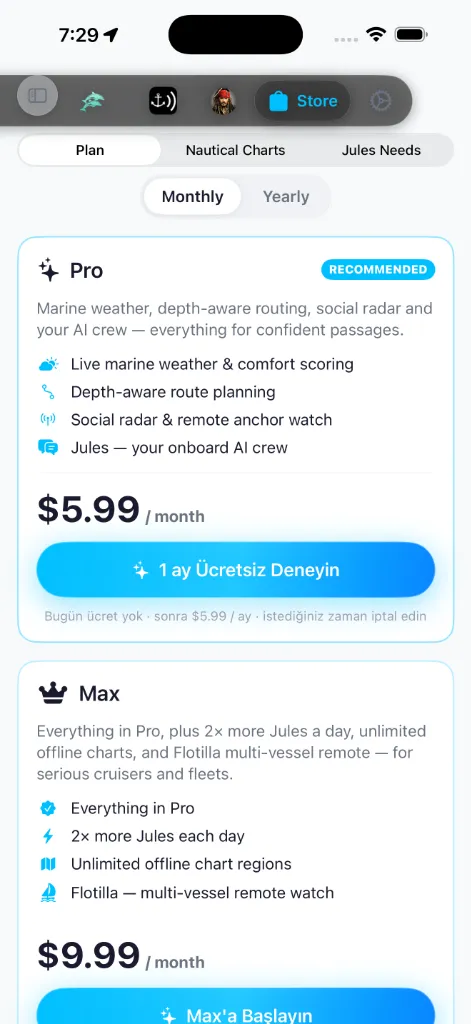
Deux formules payantes — Pro et Max — sont affichées côte à côte, chacune
une fiche vedette listant son prix, ses fonctions et un bouton d'achat, avec une
bascule partagée Mensuel / Annuel au-dessus. Pro porte un badge
RECOMMANDÉ. La formule sur laquelle vous êtes actuellement est marquée
Formule actuelle, et affiche quand elle se renouvelle ensuite — Renouvelle
le 12 mai 2026 — ou, si vous avez annulé, quand elle expirera — Expire le 12
mai 2026.
Depuis l'offre gratuite, le bouton d'achat affiche Démarrer Pro ou Démarrer
Max, avec une ligne Annulez à tout moment · sans engagement à long terme en
dessous. Si vous êtes déjà sur Pro et que vous regardez la fiche Max, il affiche
Passer à Max. Un essai gratuit n'est pas garanti : seulement si une formule en
est configurée avec un, le bouton passe à Essayer N jours gratuits et ajoute
une ligne Aucun frais aujourd'hui · puis prix · annulez à tout moment — à
l'heure où ces lignes sont écrites, aucune formule ne comporte d'essai, donc le
chemin en vigueur est celui Démarrer / Annulez-à-tout-moment ci-dessus.
L'option de facturation Annuelle porte un badge ÉCONOMISEZ % (ou un badge
MEILLEURE VALEUR pendant que les économies exactes se chargent encore) et une
note « Facturé annuellement · environ ≈ équivalent par mois » pour que vous
puissiez comparer au Mensuel d'un coup d'œil.
Toute la Boutique — Formule, Besoins de Jules et les fiches de régions de cartes —
suit la langue de votre appareil ; sur un appareil en turc, chaque libellé, bouton
et badge est affiché en turc.
Une bannière Allocation IA quotidienne de Jules (la fiche pieuvre) expose
combien de Jules chaque palier obtient par jour, pour que les
formules soient comparables d'un coup d'œil :
C'est un budget quotidien qui se recharge chaque jour ; pour des recharges
ponctuelles par-dessus, voir [Besoins de Jules](#jules-needs) ci-dessous.
Ce que les abonnements débloquent :
social et veille au mouillage à distance.
Max ajoute deux choses par-dessus tout ce qui est dans Pro :
pack de cartes gratuit).
les groupes de croisière.
Sous les formules se trouve une petite rangée de Modules complémentaires,
affichée uniquement quand il y a quelque chose à proposer. Deux produits y font
surface :
l'imagerie satellite haute résolution sur la carte.
SafeAnchor À distance à elles seules ; il accorde le
même accès À distance de niveau Pro sans une formule Pro complète.
Chacun affiche son prix ; le toucher ouvre la feuille d'achat d'Apple. (Un produit
Journal de bord du capitaine séparé est hérité et n'est plus vendu aux
nouveaux capitaines.)
Apple gère la facturation. Pour annuler, utilisez les Réglages → votre nom →
Abonnements d'iOS — AnchorQueen reste sur l'offre gratuite lorsque la période
payante prend fin.
Migration des produits & applications hérités
Avec le lancement de l'application unifiée AnchorQueen (qui fusionne les anciennes plateformes autonomes AnchorAlarm et SeaTracker en un seul espace de travail unifié), nous avons rationalisé nos formules d'abonnement et retiré les produits hérités :
Cartes — régions
La section Cartes à la fois gère les régions que vous avez déjà et vous permet de
parcourir et d'acheter de nouvelles. Elle est divisée par un sélecteur segmenté
Mes cartes | Boutique :
Méditerranée, côte est des États-Unis, Baltique, et ainsi de suite.
En haut, une vedette de stockage affiche trois statistiques : Installées
(nombre de régions), Sur l'appareil (disque utilisé) et Disponibles
(régions que vous pouvez encore télécharger). Une pastille Vérifier les mises à
jour se trouve en dessous ; la toucher force un rafraîchissement du catalogue et
affiche un message — Toutes les cartes sont à jour. ou *N mises à jour
disponibles.* Tirez vers le bas pour rafraîchir exécute la même vérification en
silence.
Une bascule Carte / Liste (en haut à droite) change la façon dont le catalogue
est affiché :
pour ouvrir sa feuille de détail. Une légende se trouve dans le coin : vert
Installée, orange Téléchargement, indigo Disponible, gris Indisponible.
Chaque fiche de région affiche une vignette de couverture de la zone, la taille de
téléchargement (ou sur disque), la source de données et des pastilles d'état. Les
fiches installées ajoutent des pastilles de santé et de licence :
vous avez reporté une mise à jour proposée.
sur le disque — touchez la pastille pour re-télécharger uniquement les
fichiers hors ligne défectueux (vos données personnelles ne sont jamais
touchées).
Sur une fiche installée, la commande de fin de ligne est une bascule de
visibilité plus un menu (Afficher dans les cartes, Supprimer). Lorsqu'une mise à
jour est proposée, elle devient une pastille METTRE À JOUR, et le menu gagne
Mettre à jour vers v… et Me rappeler plus tard (qui reporte cette version
exacte jusqu'à ce qu'une plus récente soit publiée).
Allocation de packs de cartes gratuits
Selon votre palier d'abonnement, vous recevez des emplacements de pack de cartes gratuit offerts qui vous permettent de débloquer des régions de cartes haute résolution complètes sans acheter d'abonnements individuels :
Si vous souhaitez accéder à davantage de régions de cartes au-delà de l'allocation gratuite de votre palier, vous pouvez acheter des abonnements payants annuels individuels (14,99 $/an par région) sans limite sur le nombre de régions que vous pouvez détenir.
Le registre permanent d'emplacements (politique anti-triche)
Pour garantir le fair-play et empêcher les abus de recyclage d'emplacements (tels que réclamer, supprimer et recycler des régions à répétition), les packs de cartes gratuits réclamés utilisent un registre permanent d'emplacements sécurisé :
Gratuit pour vous — section épinglée
Lorsque vous parcourez le sous-onglet Boutique, toute région qui ne vous coûte
rien pour l'instant est remontée dans une section Gratuit pour vous épinglée en
haut de la liste (marquée d'une icône cadeau). Cela couvre deux cas :
(simple téléchargement, sans frais).
chaque région que vous ne possédez pas encore est réclamable, donc le catalogue
fait surface ici avec un bouton RÉCLAMER GRATUITEMENT (avec un décompte
« N restants » en dessous). Une fois vos emplacements épuisés (ou sur l'offre
gratuite, qui n'en a aucun), la section se replie et seules les régions
possédées restent.
Les régions payantes continuent d'apparaître en dessous, groupées par littoral.
Touchez une fiche pour ouvrir la feuille de détail de la région, qui se lit comme
un court guide de croisière pour la zone :
coordonnées de coin sud-ouest → nord-est, dérivées de la boîte englobante de la
région.
bathymétrique, fusion du littoral, marinas, aides à la navigation, dangers
cartographiés).
avec un Ou s'abonner
Passer à
abonnement de carte.
disponibles.
Une région que vous installez devient disponible hors ligne sur chaque onglet
de carte — SeaTracker, Capt's Notebook et Merconi.
Mes cartes — état des abonnements
Les régions que vous avez réclamées ou auxquelles vous vous êtes abonné apparaissent sous Mes cartes, et chaque fiche affiche où en est son état de licence :
Cycle de vie de l'expiration et de la période de grâce
Pour équilibrer la sécurité avec la sûreté en mer, les régions expirées (à la fois les abonnements payants et les packs gratuits expirés) transitent par un cycle de vie d'expiration à 3 états. L'état s'affiche sur la fiche de région comme l'une des pastilles décrites dans [Mes cartes](#my-charts) ci-dessus — un vert Renouvelle / Pack gratuit actif, un orange Expiré · Routage désactivé / Pack gratuit expiré / touchable Renouveler · prix, ou un rouge Expiré · Verrouillé :
L'état d'une carte se met à jour automatiquement quand elle se renouvelle, quand vous annulez, ou après une Restauration des achats.
Besoins de Jules — packs de jetons
Chaque formule donne à Jules un budget de jetons quotidien qui se
réinitialise chaque jour. Si vous l'épuisez avant la réinitialisation — une longue
session de planification, une traversée chargée — la section Besoins de Jules
vend des packs de jetons ponctuels qui ajoutent de la capacité bonus par-dessus
votre budget quotidien.
En haut, un panneau d'utilisation affiche où vous en êtes aujourd'hui :
formule).
En dessous se trouvent trois packs, du plus petit au plus grand :
chargées.
Chaque fiche affiche son décompte de jetons, une accroche d'une ligne et un bouton
Acheter · prix ; Apple affiche sa propre feuille de confirmation. Dès que
l'achat est validé, les jetons sont ajoutés à votre solde bonus et le panneau
d'utilisation se met à jour.
Les packs de jetons sont un achat ponctuel, pas un abonnement. Les jetons bonus
n'expirent jamais, et ils ne sont prélevés qu'après que votre budget quotidien
de formule est épuisé — donc un pack que vous achetez aujourd'hui aide encore des
semaines plus tard.
Mises à jour
Lorsque de nouvelles données sont publiées pour une région, une pastille de mise
à jour apparaît sur l'onglet Boutique lui-même et sur la fiche de région. Touchez
Mettre à jour pour tirer les données fraîches ; l'ancienne installation est
remplacée de façon atomique.
Recherche et filtrage
Une barre de recherche restreint le catalogue par nom. Des puces de filtre groupent
les régions par mer ou par continent.
Si quelque chose ne va pas
confirmez que vous êtes connecté à l'identifiant Apple que vous avez utilisé pour
l'acheter.
de la région, ou annulez et recommencez sur une meilleure connexion.