
 Ankarlarm
AnchorQueen användarmanual
Välkommen ombord. AnchorQueen är en komplett marin följeslagare: sjökort,
ankarvakt, marin AI-officer, väder, butik och kaptensprofil — allt i en enda
app. Den här manualen täcker varje skärm.
Manualen fungerar helt offline — ingen anslutning behövs till sjöss.
Så är appen organiserad
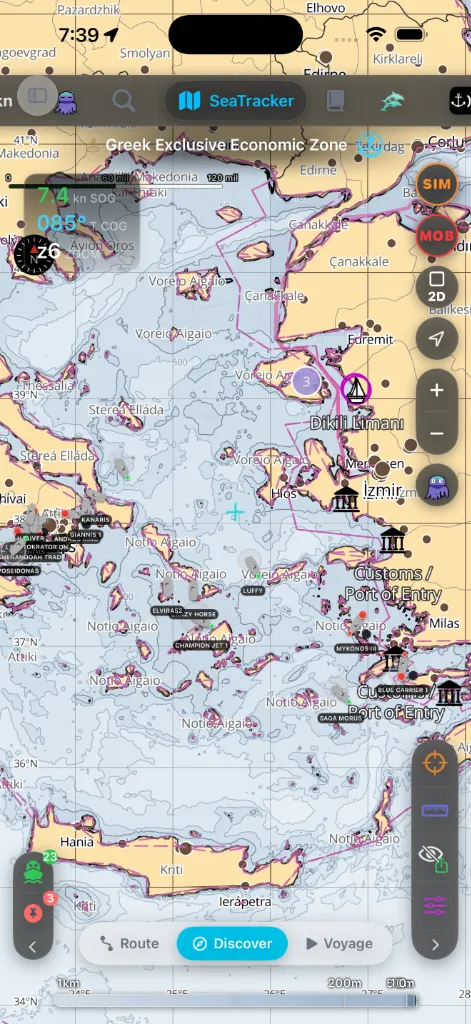
AnchorQueen har nio toppflikar längs sidan (liggande / iPad) eller upptill
(stående iPhone). Fem av dem är sjökort och utforskning; fyra är
följeslagarflikar.
| # | Flik | Vad den används till |
|---|---|---|
| 1 | 🗺️ SeaTracker (sjökort) | Sjökortet. Planera rutter, upptäck platser, navigera resor. |
| 2 | 📓 Capt's Notebook | Ditt privata sjökort, ordnat kring de märken du har sparat. |
| 3 | 🐬 Merconi | Marint liv och havsutforskning — dykplatser, fiskebevakning, havsdata. |
| 4 | ⚓ SafeAnchor | Ankarvakten — radar, larm, fjärrövervakning. |
| 5 | 🐙 Jules (CrewAI) | Din AI-medkapten. Fråga om vad som helst, med röst eller text. |
| 6 | 🛍️ Butik | Sjökortsregioner och prenumerationer. |
| 7 | ⛈️ Meteo | Marint väder, tidvatten, varningar och 10-dygnsmeteogrammet. |
| 8 | 👤 Kapten | Din profil, inloggning, inställningar, prenumerationsstatus. |
| 9 | ⚙️ Inställningar | Alla appinställningar, plus installerade sjökortsregioner och partner. |
Läs det här först
göra under de första fem minuterna.
sidofältet, kartkontrollerna och MOB-knappen som svävar över varje flik.
Ett ämne per flik
När något inte stämmer
Säkerhetsmeddelande
AnchorQueen är ett hjälpmedel för navigation och ankarvakt. Den ersätter inte
officiella sjökort, en tidvattentabell, en ordentlig ankarvakt i hårt väder
eller sjövägsreglerna.