
Uyuyun. Nöbet tutuluyor.
iPhone için ücretsiz çapa alarmı — demir atın, otomatik yarıçapı kabul edin ve uyuyun.
Çapa alarmı ücretsiz — kart yok, deneme duvarı yok.
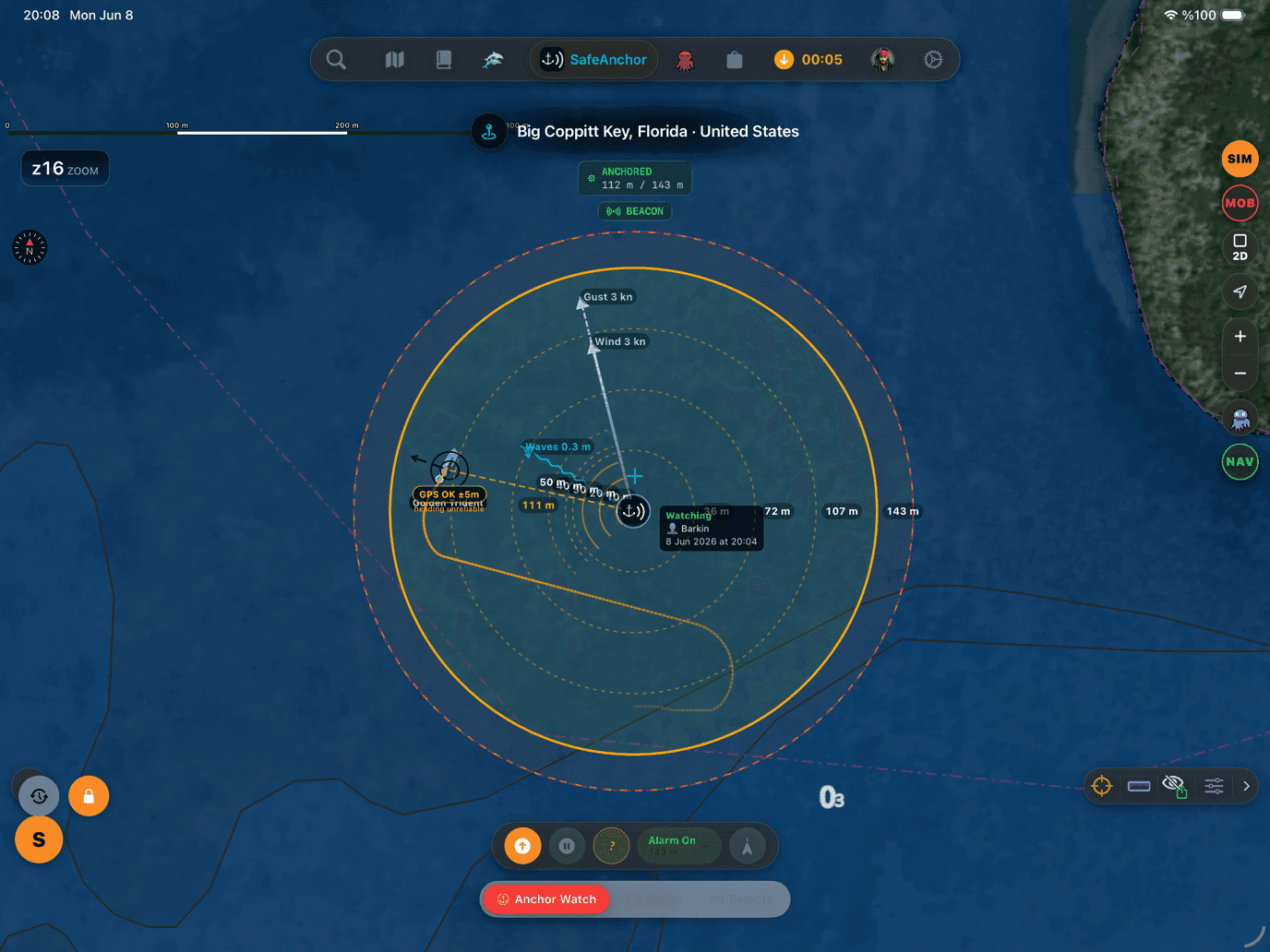
Orijinal SafeAnchor.net uygulamasıyla mı seyrediyordunuz? Bildiğiniz her şey hâlâ gemide — klasik radar ekranı, demirleme geçmişiniz ve uygulamayı her zamanki gibi başlatan bir ayar.
Demirde bir gece, adım adım
Ciddi bir çapa nöbetinin gerektirdiği her özellik; gerçek GPS izinize, canlı hava durumuna ve omurganızın altındaki haritaya dayanır.
Demir atın
Teknenin oturmasını bekleyin, Demir At'a dokunun — pim sabitlenir sabitlenmez nöbet kendini kurar. Ayrı bir kurma adımı yok.
Otomatik yarıçapı kabul edin
GPS'e duyarlı alarm yarıçapı sizin için ayarlanır — salınımınız artı GPS doğruluğu payı. Kaydırıcıyla istediğiniz an yeniden ayarlayın.
Her durumda korumada
Evet. Arka planda alarm, onaylanana kadar 5 dakika boyunca her 30 saniyede bir yinelenen Kritik Uyarı bildirimi olarak gelir. Sistem düzeyindeki geofence de nöbeti yedekler: iOS uygulamayı kapatsa bile tarama tetiklenir.
Çapa tararsa
Evet. Kritik Uyarılara izin verildiğinde tarama alarmı, telefon sessizde, zil sesi kısık ya da Odak / Rahatsız Etmeyin açıkken bile çalar. İzni reddederseniz, Odak'ı delen ama sessiz anahtarına saygı gösteren Zamana Duyarlı bildirime geçilir.
Gece nöbetiniz için gereken her şey
Ciddi bir çapa nöbetinin gerektirdiği her özellik; gerçek GPS izinize, canlı hava durumuna ve omurganızın altındaki haritaya dayanır.
Çapa tarama alarmı
GPS kilitli demir atma
Sessizi delen alarmlar
Zemin ve tutuş
Sürüklenme tahmini
Uzaktan izleme
Güvertedeki nöbet
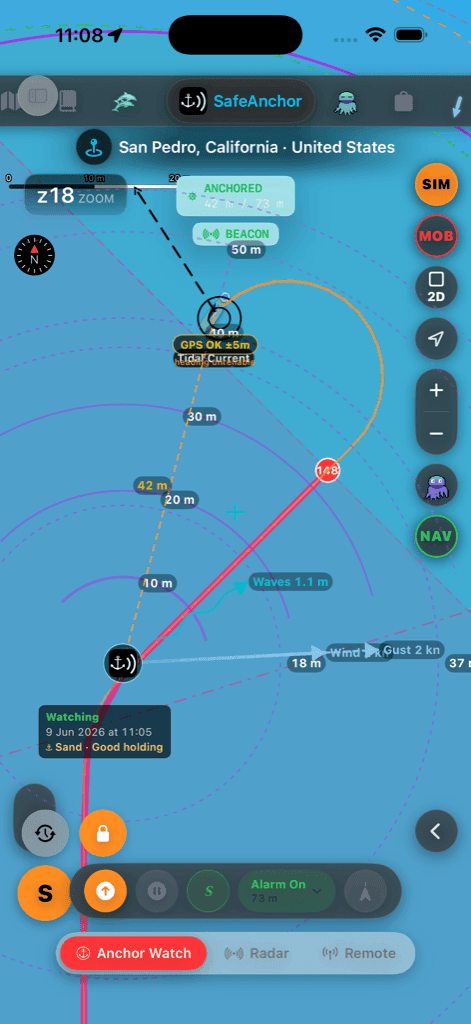
SafeAnchor sekmesinden gerçek bir yakalama — salınım dairesi, zemin rozeti ve komuta paneli.
SafeAnchor.net uygulaması yola devam ediyor
AnchorQueen, SafeAnchor.net'ten doğdu — App Store'daki aynı uygulama, yerinde güncellendi. Hiçbir şey kaldırılmadı: yıllardır güvendiğiniz çapa nöbeti akışı, yeni haritalar, rota planlama, hava durumu ve Jules'un yanında SafeAnchor sekmesinde yaşıyor.
Klasik Radar ekranı
Orijinal radar tarzı çapa ekranı olduğu gibi korunuyor — aynı demir at / vira / alarm akışı, bir sekme ötede.
SafeAnchor ile başlat
Ayarlar'daki tek bir anahtar, uygulamayı açılışta doğrudan klasik ekranda başlatır — deneyimi tam eskisi gibi isteyen kaptanlar için.
Geçmişiniz yerinde
Demirleme noktaları, izler ve hesabınız olduğu gibi duruyor — aynı uygulama olduğu için taşınacak bir şey yoktu.
Ayarlar → Safe Anchor → Start with SafeAnchor
Çapa alarmı soruları, yanıtlandı
iPhone sessizdeyken çapa alarmı çalışır mı?
Evet. Kritik Uyarılara izin verildiğinde tarama alarmı, telefon sessizde, zil sesi kısık ya da Odak / Rahatsız Etmeyin açıkken bile çalar. İzni reddederseniz, Odak'ı delen ama sessiz anahtarına saygı gösteren Zamana Duyarlı bildirime geçilir.
Ekran kilitliyken veya uygulama arka plandayken nöbet sürer mi?
Evet. Arka planda alarm, onaylanana kadar 5 dakika boyunca her 30 saniyede bir yinelenen Kritik Uyarı bildirimi olarak gelir. Sistem düzeyindeki geofence de nöbeti yedekler: iOS uygulamayı kapatsa bile tarama tetiklenir.
Hangi alarm yarıçapını ayarlamalıyım?
Çoğu zaman gerek yok: demir atınca GPS'e duyarlı yarıçap otomatik ayarlanır — salınımınız artı GPS doğruluğu payı. Kapsam çipine dokunup kaydırıcıyı açın; daha fazla kaloma verdiğinizde yeniden ayarlayın.
Çapa alarmı ücretsiz mi?
Evet — çapa nöbeti, tarama alarmı ve Kritik Uyarılar ücretsizdir; kart ve deneme duvarı yoktur. Abonelikler sürüklenme tahmini ufkunu uzatır ve gerçek zamanlı uzaktan izleme ekler.
SafeAnchor.net kullanıyordum — uygulamam nereye gitti?
Hiçbir yere. AnchorQueen, App Store'daki aynı uygulama; yerinde güncellendi. Klasik çapa alarmı ekranı SafeAnchor sekmesinde yaşıyor, geçmişiniz korunuyor ve Start with SafeAnchor ayarı uygulamayı doğrudan oraya açıyor.
Nöbeti bu gece kurun
iPhone için ücretsiz çapa alarmı — demir atın, otomatik yarıçapı kabul edin ve uyuyun.